Daily OS
A personal operating system I built to run my job and contract search like an actual job. Three layers: a fixed weekly schedule on my calendar, a morning agent that pulls the day's best openings before I am awake, and a logbook app to record the work.
Two of the three stuck. The calendar and the agent run every weekday. The logbook I built end to end, deployed, and then never really used. That is the useful part, so it is up front.
Why I built it
When you are between roles, the hardest part is structure. There is no one telling you what to do, so it is easy to drift.
I wanted to treat the search like a full-time job, with a real routine and a real way to see whether I was actually doing the work. So I built my own system for it instead of forcing my week into a generic to-do app.
It comes in three layers, and each one solves a different part of the same problem.
Layer 1: the calendar
The schedule lives in Google Calendar, not in the app. Recurring weekday blocks for the things that matter:
- A morning workout.
- An applications block.
- A build and case-study block.
- An outreach block.
- An AI learning block.
- An admin and shutdown block to close the day, plus a weekly review block on Sunday.
Every block is set to Free availability on purpose, so booking links and interview times stay open and nobody sees me as busy when they go to grab a slot.
Layer 2: the morning agent
A scheduled cloud agent runs every weekday at 5:30am Eastern, before I am at my desk.
It searches the web for fresh job and contract openings in the lanes I care about (AI Solutions and Implementation Engineering and GTM/RevOps Engineering, with Forward Deployed roles as a swing), then hands me a ranked shortlist to read when I sit down.
The applications block does not start with a blank search bar. It starts with a list already waiting.
Layer 3: the logbook, and why it did not stick
The calendar tells me what to do. The logbook is where I record that I did it.
It is a single-page web app, deployed on Vercel, built around the same six buckets I block out on the calendar: Workout, Applications, Case Study, Outreach, AI Learning, and a Daily Shutdown.
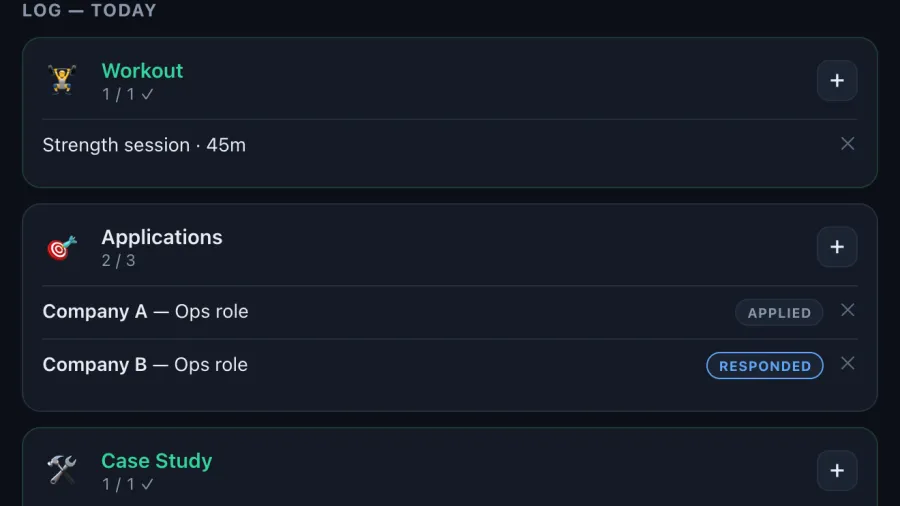
Each bucket takes real entries, not just a checkmark. Applications capture company, role, and a link, plus a clickable status that moves through Applied, Responded, Interview, Offer, and Rejected, so the log doubles as a simple pipeline tracker.
Outreach captures who and which channel. Case studies and learning capture what I built or learned, which feeds a running "Menu" of everything produced (the raw material for a portfolio like this one).
What sits on top of the logging
- A To-Do and Backlog list seeded with my real starter tasks.
- A day-streak counter that only counts a day if I hit at least four of the six buckets.
- Weekly target bars.
- A Follow-ups panel that automatically flags applications sitting too long at Applied or Responded, and outreach that has gone quiet.
- JSON export and import, so I always have a backup.
The logbook wanted me to hand-type every application, status, and follow-up, and I never finished its sign-in or really used it.
Ten weeks of applying showed me why. That manual tracking is exactly what I went on to automate somewhere else.
How the logbook is built
The frontend is a single vanilla HTML and JavaScript file, no framework. It is local-first: everything saves to the browser immediately so it works even with no connection.
Behind it sit two small Vercel serverless functions, one for cross-device sync (a per-user record in Neon Postgres) and one for public config.
Why sync is coded but switched off
The sync layer is built to use Google sign-in, verify the token on the server, and store each user's data as a single JSON blob keyed to their account, with the design pulling the day's calendar blocks in read-only.
Right now it runs in local-only mode. The sync and Google sign-in are coded and deployed, but they stay dormant until I wire in the Neon connection string and the Google OAuth client.
The config endpoint checks for both and flips sync on automatically once they are set. So the logging, to-dos, streaks, and follow-ups all work today, and the cross-device sync turns on the moment I finish the setup.
What it shows
This one is personal, not client work, so I can be open about it. It is a small but complete full-stack build: a real schedule, and an automation that does useful work while I am still asleep.
The layers that stuck run on their own. The one I had to feed by hand did not, and I would rather say that than dress it up.
I am non-technical by training, and I shipped the whole thing end to end with AI as the pair. That is the point of it being here.